Posts

The Android Hello World tutorial (part 2)
Image
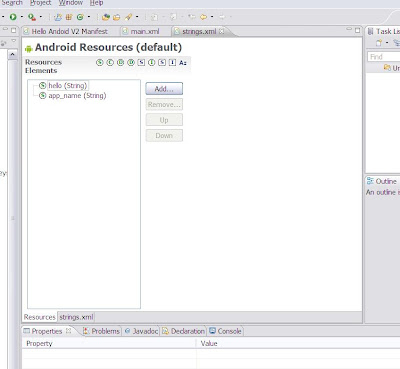
If you are continuing to follow the android tutorial, you will now be creating a new hello world program that defines its string inside the strings.xml file rather than inside the helloAndroid class. In the tutorial you write XML directly. I found that it was easy to make errors. Luckily the Android Debug Tools (ADT) Eclipse plug-in means that you often don’t have to write XML. For example if you double click on the strings.xml file in the res/layout directory, Eclipse will open a window on the xml file. If you click on the resources tab at the bottom of the window you can add, edit, delete and reorder strings without having to worry about matching your start and end tags etc. If you do the same to the main.xml file in the res/layout directory Eclipse will show you the resulting string drawn on the device screen. The tutorial ends by deliberately creating a null pointer exception and showing how to create a breakpoint. If you run the program in debug mode with a breakpoint set on line ...
The Android Hello World tutorial

Image
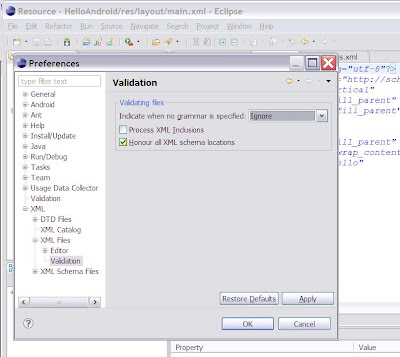
In time honoured fashion the first android program you write will be a hello world program. This is very straight forward and well documented in http://developer.android.com/guide/tutorials/hello-world.html Here are a few tips. 1. When building your program you will receive the following warning about each of the XML files in the build. No grammar constraints (DTD or XML schema) detected for the document The XML files used to build android applications don’t use DTD or a schema, so I would recommend turning this warning off within Eclipse. Choose preferences from the Eclipse Windows top level drop down menu. The warning is turned off as in the screenshot below. 2. When you run your hello world application the tutorial says you will see a screen like this. 3. You will not, you will see this. It is nothing to worry about, it is just that android will take a significant time to boot up and run your application in the emulator. I am using an IBM T60 with a regularly degfragmented hard dis...

Getting started with Android

Image
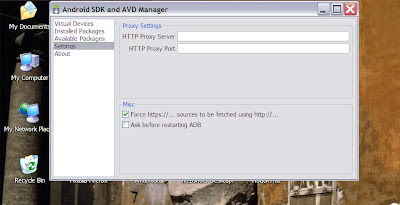
The first step in getting started with Android is to download your development environment. This involves: 1. Downloading and installing Eclipse. 2. Downloading and installing the Android Software Development Kit (SDK) 3. Installing the Android Debug Tools (ADT) plugin for Eclipse 4. Adding the target platforms and other components. This is documented clearly on the http://developer.android.com/sdk/index.html page. I am developing on an IBM T60 laptop running Windows XP SP3, so I downloaded Eclipse IDE for Java Developers (92 MB), the Android SDK, the Android ADT and all the target platforms. When I downloaded the Android SDK, unzipped it and ran setup.exe I got an error message: failed to fetch URL https://d-ssl.google.com/android/repository/repository.xml reason: HTTPS SSL error. You might want to force download through HTTP in the settings. You do this in the settings menu of the setup program as shown below. The final thing I would point out here is the instruction: To install the ...

Who is Steve Roome and why would you read his blog?

My name is Stephen Roome, and I am a Senior Managing Consultant at IBM Global Services in the UK where I specialise in complex system integration projects. I have been in the IT industry for over 30 years. I first learnt to program in Fortran writing characters onto squared paper and translating the results onto punched cards that were then fed into a mainframe. Over the years I have learnt and used other languages including BCPL, PL/M, C and C++. As I got more senior in the IT industry I lost the opportunity to write code and instead led the work of others. At IBM I have been an advocate for Linux and open source software. I have promoted the advantages of open source software both internally and to numerous customers. The projects I have led over the last few years have tended to be written in Java using Eclipse and run on Linux. However until recently I had never used Java, Eclipse or even logged onto a Linux system. As I entered my mid fifty's I decided that I needed to get b...